

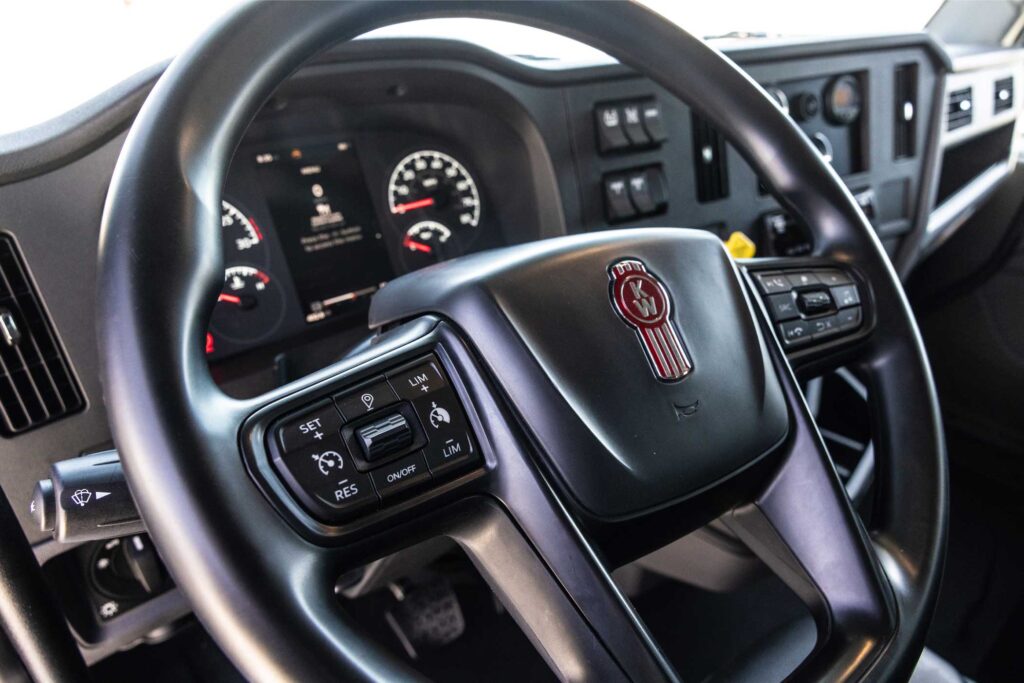
The Kenworth SmartWheel boosts convenience and safety by integrating several driver-essential controls directly into the steering wheel.
Found on many newer Kenworth models, this feature allows drivers to operate their most-used functions with ease, helping them stay focused on the road. If you value efficiency, safety, and comfort, the Smart Wheel is your best solution to making every journey smoother and safer.
SmartWheel Features
Integrated Vehicle Controls
The SmartWheel features buttons and switches for cruise control, audio adjustments, and driver assistance features. You can easily access and change these functions while both hands remain on the wheel.
User-Friendly Design
The buttons are positioned for easy thumb access, allowing you to make adjustments quickly but safely. This layout minimizes the time spent looking away from the road to operate those various controls.
Driver Assistance
Depending on the Kenworth model, SmartWheel may include controls for adaptive cruise control and lane departure assistance. Both features help you maintain a safe following distance and keep your truck centered in its lane. Plus, you receive alerts about potential road hazards.
Customizable Digital Display
In many newer Kenworth models, the SmartWheel is paired with a digital dashboard screen. The screen displays related function information such as current speed, audio settings, or incoming calls. The integration between the digital display and steering wheel controls allows drivers to monitor essential vehicle information at a glance.
Kenworth SmartWheel Controls
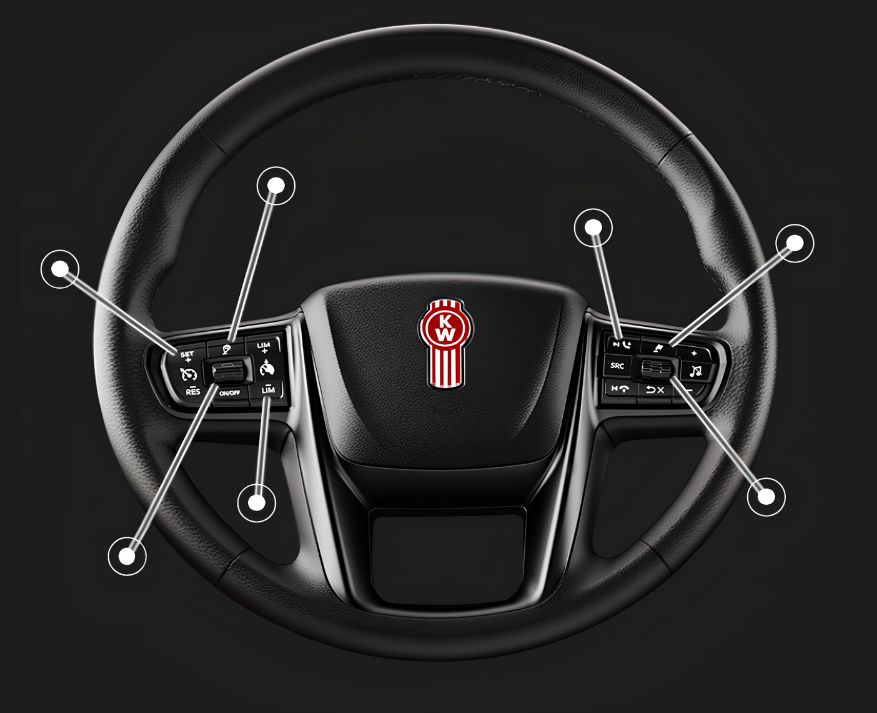
A handful of essential vehicle controls are conveniently located on the outer left and right sections of the SmartWheel, putting key functions within easy reach. These controls offer more than just simple on/off operations. You’re given quick access to traffic features, audio settings, speed controls, and other important vehicle functions — all without taking your focus off the road.
Left Side SmartWheel Controls
The left-side SmartWheel controls make highway driving easier, more efficient, and highly customizable. You can quickly access features such as Set Trip Segment, Cruise Control, Headway Adjustment, and the Variable Road Speed Limiter.
Set Trip Segment: Start and track trip segments with storage for up to 26 separate saved trips.
Cruise Control: Maintain a consistent speed to improve overall fuel economy.
Headway Adjustment: Adjust following distance while managing Predictive Cruise Control droop and overshoot settings.
Variable Road Speed Limiter: Exclusive to the PACCAR MX-13 and MX-11 engines, this feature sets pedal speed limits for speed-restricted areas like construction zones.
Right Side SmartWheel Functions
The right-side SmartWheel controls are focused on convenience, connectivity, and easy access to entertainment and communication features. You can quickly navigate between functions like Phone & Radio Source features, Customizable Screen Shortcuts, and Instrumentation Scroll & Select controls directly from the steering wheel.
Phone & Radio Controls: Adjust volume, mute audio, change tracks or stations, answer and end calls, as well as switch radio sources through Bluetooth connectivity.
Customizable Shortcut Button: Instantly access and personalize favorite screens, a digital RPM display, or dual MPH/KPH speedometer views.
Instrumentation Scroll & Select: Easily navigate the Kenworth Digital Display and customize gauge layouts to fit your driving preferences.
Kenworth SmartWheel Keeps You Safe and Comfortable
Prioritize efficiency, comfort, and safety with the Kenworth SmartWheel. By placing these essential controls on the steering wheel, you can easily access your most-used functions without taking your attention off the road. Its intuitive layout, convenient assistance features, and user-friendly controls help create a smoother and more connected driving experience. Whether you’re tackling long hauls or everyday routes, the SmartWheel helps make every mile safer, easier, and more comfortable.
Contact our team today to learn more about Kenworth SmartWheel features and what models it comes in.
Get the Latest Trucking News, Tips & More
"*" indicates required fields